Celebrate our launch! Get 30% off with code
Reviews|12 min read

GuestPix Review (2026): I Tested the "OG" QR Code Photo App

By Dan Broadbent

Founder, PicStashio · July 16, 2026

Tested June 2026 — prices and features may have changed since. Full disclosure: I'm the founder of PicStashio, a competitor. I built it partly because of gaps I saw in tools like this one, so factor in that bias. Everything below is from actually signing up and using GuestPix as both a host and a guest.
GuestPix homepage showing a wedding photo and the tagline "The Original QR Code Photo Sharing Platform For Events"
GuestPix's homepage, June 2026 — still leading with "The Original" / OG positioning. Screenshot from guestpix.com.

Ready to collect every photo from your wedding?

See Plans starting at $39
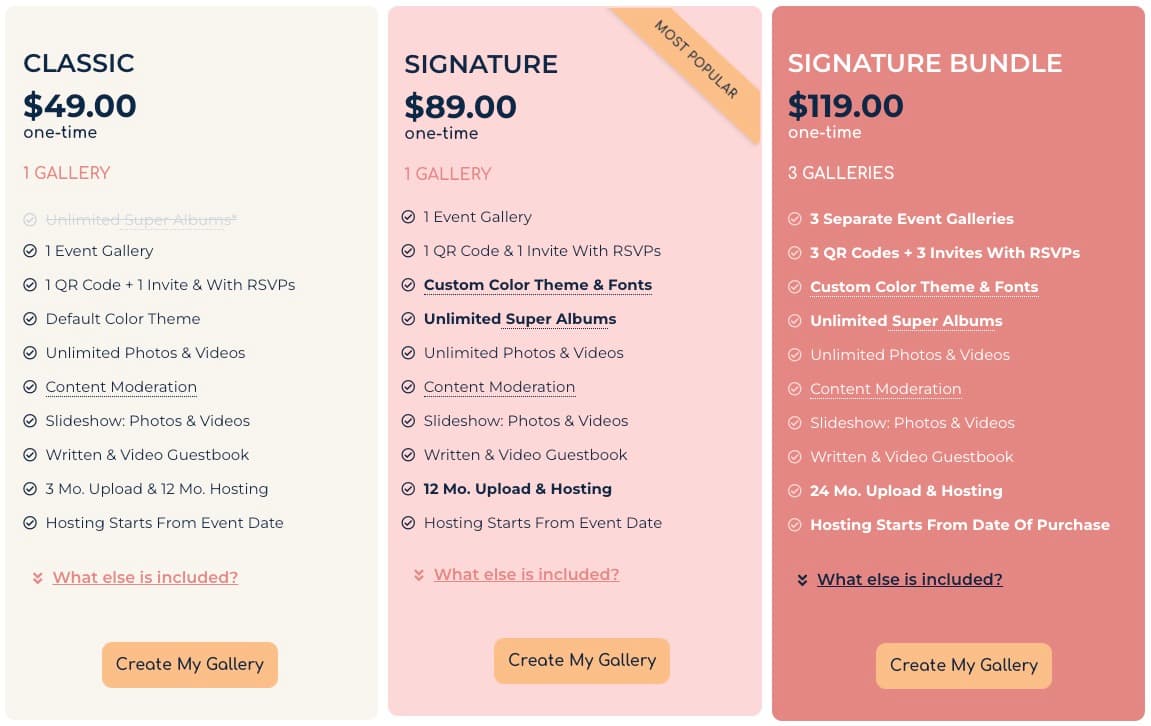
TL;DRGuestPix has the core features to get the job done, but at $49 for the cheapest package that includes video, it's overpriced for what it delivers. It self-describes as "The OG" original QR code photo-sharing platform, and it clearly was once the dominant player — but that OG status is starting to show in a dated UI and a clunky user experience, and not much has changed to keep up with the newer wave of options. If you're willing to pay a premium for the tried-and-true choice, this is it. Otherwise, there are cheaper, cleaner, more modern options out there.What is GuestPix?A private QR-code photo-sharing platform and digital guestbook. Guests scan a QR code (or click a link) and upload photos and videos straight from their phone's browser — no app download, no account required. The host gets a private gallery of everything guests captured. It's built for weddings first, but works for parties, corporate events, and memorials.GuestPix was founded by husband-and-wife team Carla and Warwick Groves and, per their site, has been used at over 150,000 events across 100 countries.What I testedI ran a free event on Safari, on both macOS and iOS, as host and guest. The free tier gets you in the door to see how the app feels, but that's about it: a 50-photo cap, no video, and a 30-day upload window. It's less a free plan and more a try-before-you-buy demo aimed at customers on the fence.Paid features I couldn't test: video uploads, custom color themes & fonts, and Super Albums (sub-galleries with their own QR codes).PricingGuestPix pricing is confusing enough that I wrote a separate post decoding it. The short version: whichever event type you choose, you'll land at the high end of what this category costs.
GuestPix wedding pricing page showing three one-time tiers side by side: Classic at $49 with one gallery, Signature at $89 marked Most Popular with custom theme and unlimited Super Albums, and Signature Bundle at $119 with three separate event galleries
GuestPix wedding tiers, June 2026: Classic ($49), Signature ($89), and Signature Bundle ($119). Screenshot from guestpix.com.
GuestPix glossaryTheir site uses some non-obvious terms. Quick decoder:
Their termWhat it means
Event GalleryThe top-level event. One QR code and RSVP per Event Gallery — you only need one per event.
GalleryThe collection of photos and videos inside the Event Gallery.
Super AlbumA sub-folder for a specific part of the event, with its own QR code.
Hosting PeriodHow long the Event Gallery stays online. Starts from either the event date or the purchase date, depending on the package.
Upload WindowThe period guests can upload — different from (and shorter than) the Hosting Period.
Social EngagementLikes and comments on photos and videos.
Content ModerationManual approval of content before it appears in the gallery.
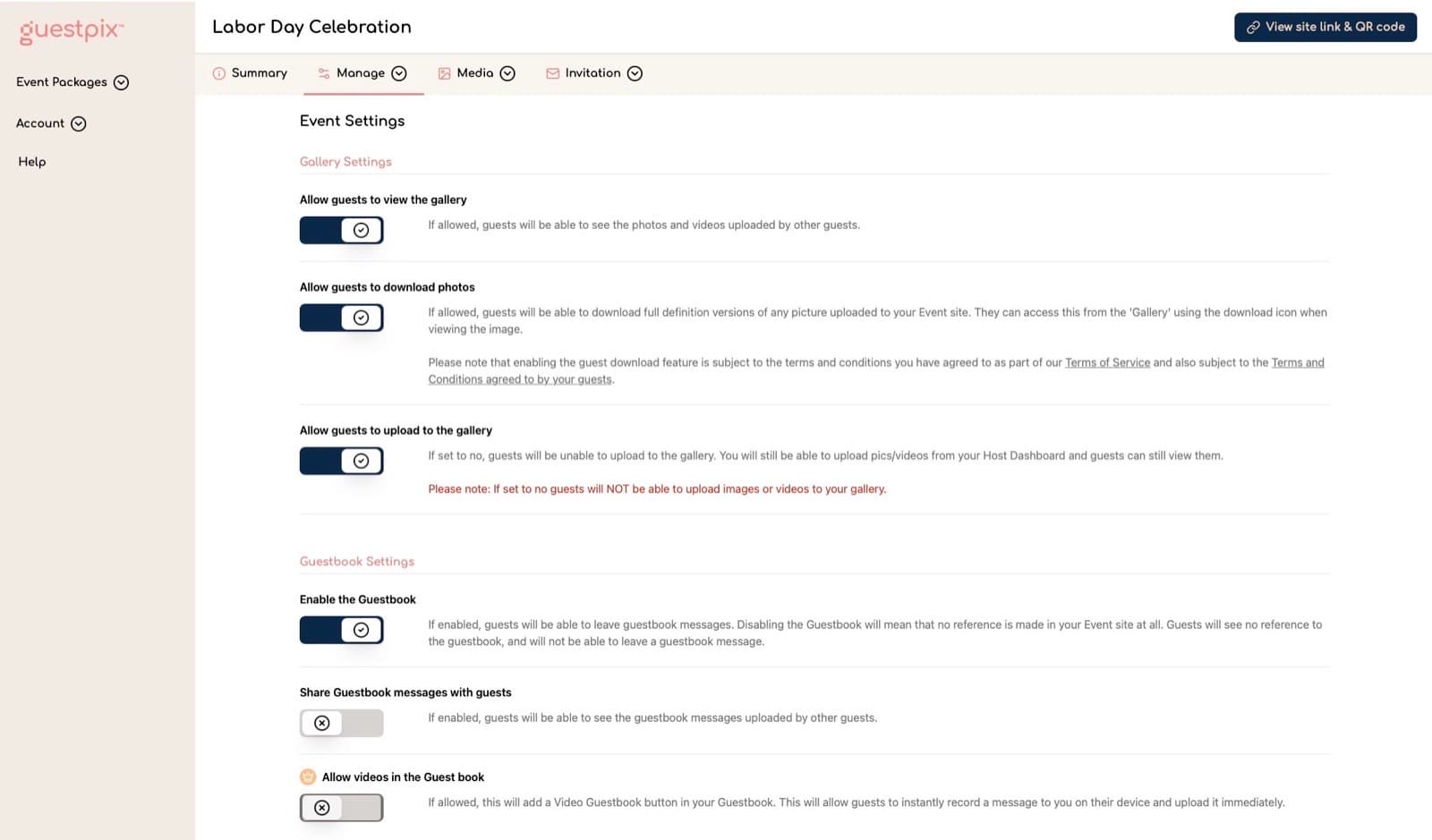
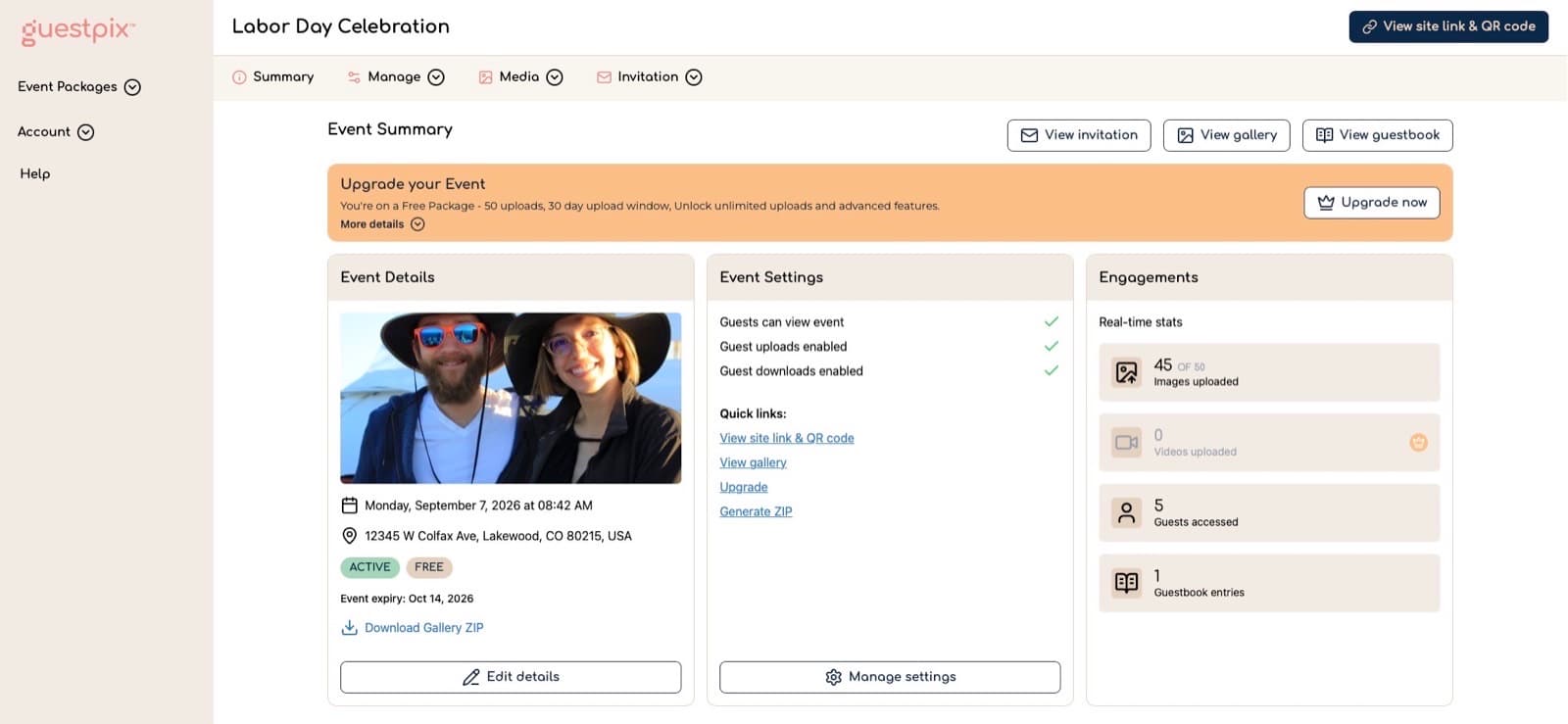
The host experienceOnboarding is painless — the hardest part is figuring out which package to buy. After verifying your email, a quick form collects your event details, then you land on a summary dashboard with quick access to edit event details, change settings, and view guest engagement (guest count, uploads, guestbook entries). There are also quick links to your gallery, guestbook, custom QR code, and zip download.Host settings are a real strength. You get fine-grained control over what guests can and can't do:View the galleryDownload photosUpload to the galleryUse the guestbookSee each other's guestbook postsDownload the zipLike photosComment on photos
GuestPix Event Settings panel showing gallery and guestbook toggles for viewing, downloading, uploading, enabling the guestbook, and sharing guestbook messages
Host settings — fine-grained control over what guests can view, download, upload, and share. Screenshot from GuestPix, June 2026.
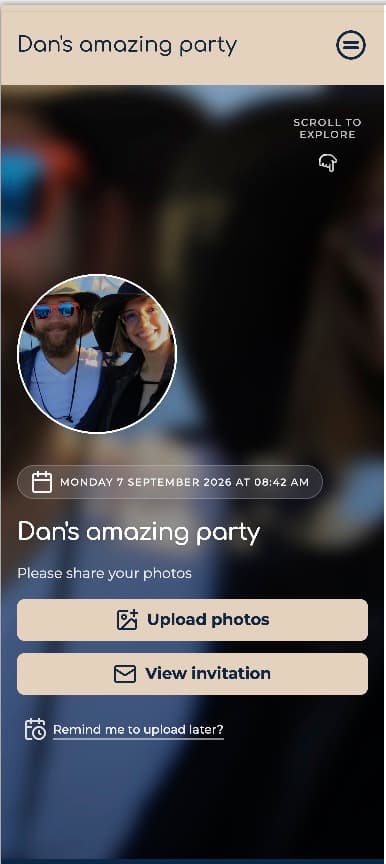
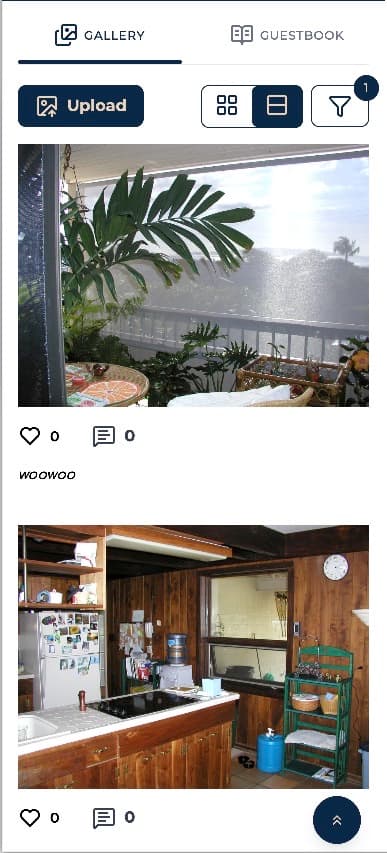
To their credit, they're still shipping: the gallery recently moved from pagination to infinite scroll. That's also a fair snapshot of the pace of innovation here.There's a nice guest list view and an RSVP option. RSVP mode requires guests to enter a display name and email and pick a status (Attending / Not / Maybe) when they scan the QR code or click the link; the host then sees everyone on an invitation management page.The zip download delivers full-resolution originals, as it should. It was hard to tell when it was ready, as the page never told me it was done. I had to refresh before the download link showed up, but I did recieve an email when it was ready.There's also a slideshow feature with the functionality you'd expect — speed, number of slides, video on or off, live refresh, and what info to overlay. It's fine. Not a reason to buy.The guest experienceGuests join by clicking a link or scanning the QR code. With a standard link, they add their name and optionally an email. With an RSVP link, email is required, plus any extra questions the host set up — dietary requirements, song requests, and so on.Once in, it's a basic experience — and that's a good thing. Guests see the event details, the gallery, the guestbook, and an upload button. The uploader works fine, I threw 40 photos (~300MB) at it in one batch on home wifi and it handled them without a problem. Slow uploads are a common complaint in older GuestPix reviews, but I couldn't reproduce it. The gallery, though, looks and feels dated. You get a notification that your upload succeeded, but the feed doesn't update to show your photo. Which sums up the whole product: gets the job done, nothing to write home about.
GuestPix guest event home on iPhone for Dan's amazing party, with Upload photos and View invitation buttons
Guest event home — upload and invitation front and center.
GuestPix mobile gallery feed showing uploaded photos with like and comment counts under the Gallery tab
The guest gallery feed — functional, but dated.
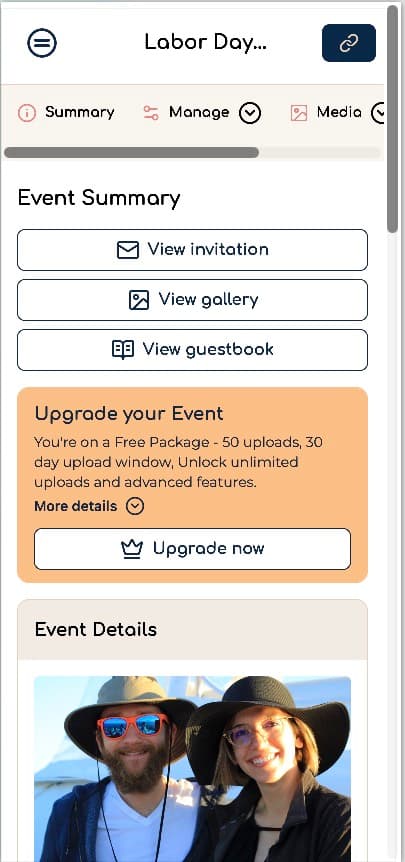
Desktop vs. mobileThe host experience is much better on desktop. The mobile version just crams the desktop layout into a smaller width — it doesn't feel made for mobile. Everything is usable; it just doesn't look or feel premium.The guest experience is fine on mobile, mostly because there isn't much to do. But even there it never feels premium — notable, given that QR scanning happens almost exclusively on phones.
GuestPix host Event Summary dashboard on desktop for Labor Day Celebration, with event details, settings checklist, and engagement stats including 45 of 50 image uploads
Host Event Summary on desktop — room for details, settings, and engagement stats.
GuestPix host Event Summary on iPhone, with the same desktop layout squeezed into a narrow mobile viewport
Same dashboard on mobile — usable, not made for the phone.
Custom QR codesGuestPix offers a bunch of free Canva templates for adding your QR code to printable signs. Some of the designs are really good. The free versions are pretty locked down (I'd assume paid Canva gives you more freedom), and it does add complexity: one more tool to learn, one more account to sign up for.Security and content moderationThere's a passcode required if someone goes straight to the event URL. Scanning the QR code or clicking the link bypasses it — invisible to guests, but it keeps out internet randos.There's no automatic content filtering, though. I uploaded test photos containing nudity and they appeared in the gallery unflagged. If that concerns you, the manual Content Moderation setting lets you approve every upload before it goes live, it works (I tested it, and it's included even on the free tier), but that's on you, potentially for hundreds of photos.What "unlimited photos and videos" actually meansThe packages advertise unlimited uploads, but there are storage caps in the fine print:
PackageStorage cap
Classic200GB
Signature400GB
Signature Bundle400GB
Business (all)1,000GB
To be fair, their own note is reasonable: "Just to reassure you, it is extremely rare to reach this data limit as our platform is designed to not be restrictive." And they're right — 200GB is a lot of phone photos, and they'd probably grant more on a reasonable request. Just know that "unlimited" has a number attached.VerdictGet GuestPix if: you want the longest-established name in the category, you'll use the fine-grained host controls and RSVP features, and you don't mind paying a premium for it.Skip it if: you're budget-conscious, you want a modern interface, or upload windows and storage fine print rub you the wrong way. The core job, collecting guest photos via QR code, is done as well or better by newer, cheaper tools.Where PicStashio fitsSince I told you my bias up front, here's the short version of what I built instead: PicStashio has a genuinely free tier (1GB for 90 days — enough to actually use at a small event, not just demo), storage-based pricing instead of package tiers, no upload windows, and every feature at every tier. If you're comparing options, start a free Stash and judge for yourself.

Ready to collect every photo from your wedding?

See Plans starting at $39
Frequently asked questions

Is GuestPix worth it in 2026?

GuestPix gets the core job done — QR uploads into a private gallery — but at $49 for the cheapest package with video it's expensive for a dated UI and clunky UX. Worth it if you want the longest-established name and fine-grained host controls; skip it if you want a modern interface or better value.

How much does GuestPix cost?

It depends on which event page you buy from, but wedding packages start at $49 (Classic with video), then $89 (Signature) and $119 (Signature Bundle). For the full breakdown, see GuestPix pricing explained. Prices across event types generally sit at the high end of this category.

Does GuestPix have a free plan?

There's a free event option capped at 50 photos, no video, and a 30-day upload window — more of a try-before-you-buy demo than a usable free plan for a real event.

Is GuestPix's "unlimited photos and videos" really unlimited?

Not literally. Classic has a 200GB storage cap, Signature and Signature Bundle 400GB, and Business packages 1,000GB. Those limits are high for phone photos, but "unlimited" still has a number attached.

Does GuestPix automatically filter inappropriate content?

No. There's no automatic content filtering. Manual Content Moderation lets you approve every upload before it goes live — and it's available even on the free tier — but you have to turn it on and review uploads yourself.

Dan Broadbent

Founder & Software Engineer, PicStashio

July 16, 2026

Dan is a software engineer who built PicStashio after his brother's Maui wedding. He researches the QR photo-sharing market hands-on and writes plain-English breakdowns of how the tools — including competitors — actually price and work, so couples can choose with their eyes open.

Ready to collect every photo from your wedding?

See Plans starting at $39